NDJSON Validator
Validate your NDJSON data instantly - 100% client-side, secure, and fast. Check syntax, detect errors, and ensure data integrity.
{"id":1,"name":"Alice","valid":true}
New: Auto-fix expanded to 10 strategies covering all common NDJSON mistakes, plus CSV export, JSON Schema validation, and real-world examples. See common NDJSON mistakes
Validate Your NDJSON or JSONL File
Drag & Drop Your NDJSON File
or
Supports: .jsonl, .ndjson, .json, .txt
Load Example NDJSON Data
Real-World Examples
Import NDJSON from URL
The remote server must allow CORS requests. Data is fetched directly by your browser.
Validation Options
Total Lines
0
Valid Lines
0
Error Lines
0
Success Rate
0%
Error Details
Warnings
Pretty Print Output
Table View
Validator Features
100% Client-Side
Your data never leaves your browser. All validation happens locally for maximum security and privacy.
Lightning Fast
Validate thousands of lines instantly with optimized JavaScript parsing and error detection.
Detailed Error Reports
Get precise line numbers, error types, and helpful messages to fix issues quickly. Every message it reports is explained in the error dictionary.
Schema Consistency
Optionally check that all records have consistent field names for data integrity.
Duplicate Detection
Find duplicate ID values across your dataset to ensure data uniqueness.
Auto-Fix Engine
10 fix strategies automatically repair common mistakes: bad quotes, trailing commas, comments, BOM markers, and more.
How It Works
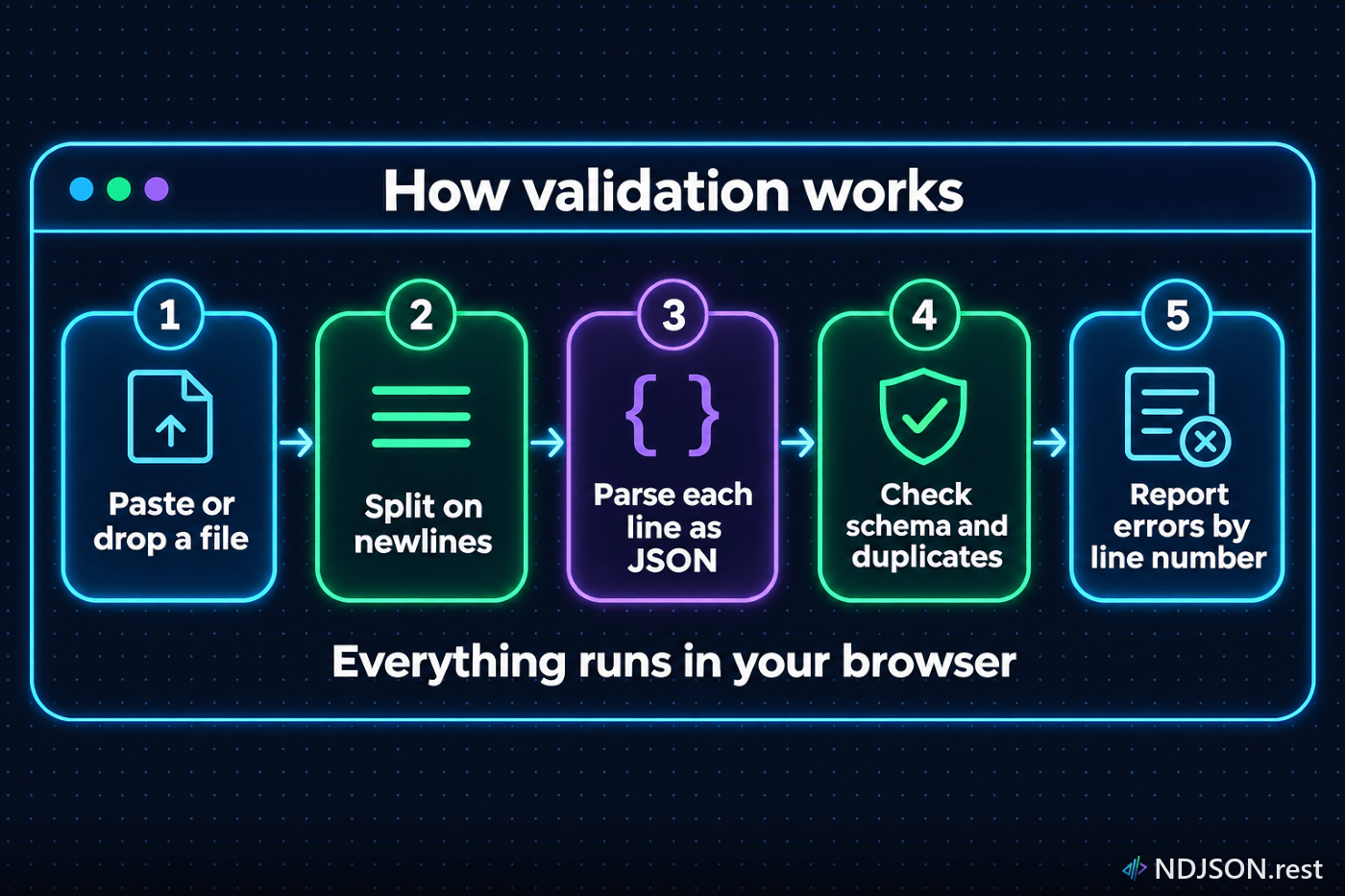
Input Your Data
Paste NDJSON text, upload a file, or load an example dataset to begin validation.
Line-by-Line Parsing
Each line is parsed independently as JSON, catching syntax errors with precise line numbers.
Advanced Checks
Optional schema consistency and duplicate ID detection run on valid records.
Get Detailed Results
Review statistics, error details, and download clean data or error reports.
Your Data Stays Private
This validator runs 100% in your browser using JavaScript. Parsing, schema checks, conversion and auto-fix all happen in this tab, and validating sends no network request. Your NDJSON data is never uploaded to any server.
One caveat, stated plainly. So your work survives an accidental refresh, the input box and your checkbox settings are saved to this browser's localStorage, which means a copy sits on your own disk until you remove it. That copy is never transmitted anywhere, but it is not encrypted either. To remove it, empty the input box (which overwrites the saved copy) or clear this site's stored data in your browser settings. Do that before handing the machine to someone else if the data is sensitive. Our privacy policy states this in writing and lists the analytics the rest of the site uses.
 The NDJSON Errors This Validator Catches
Nearly every invalid NDJSON file fails for one of a short list of reasons. Each row below is a real line you can paste into the box above to see the error report and the auto-fix for yourself.
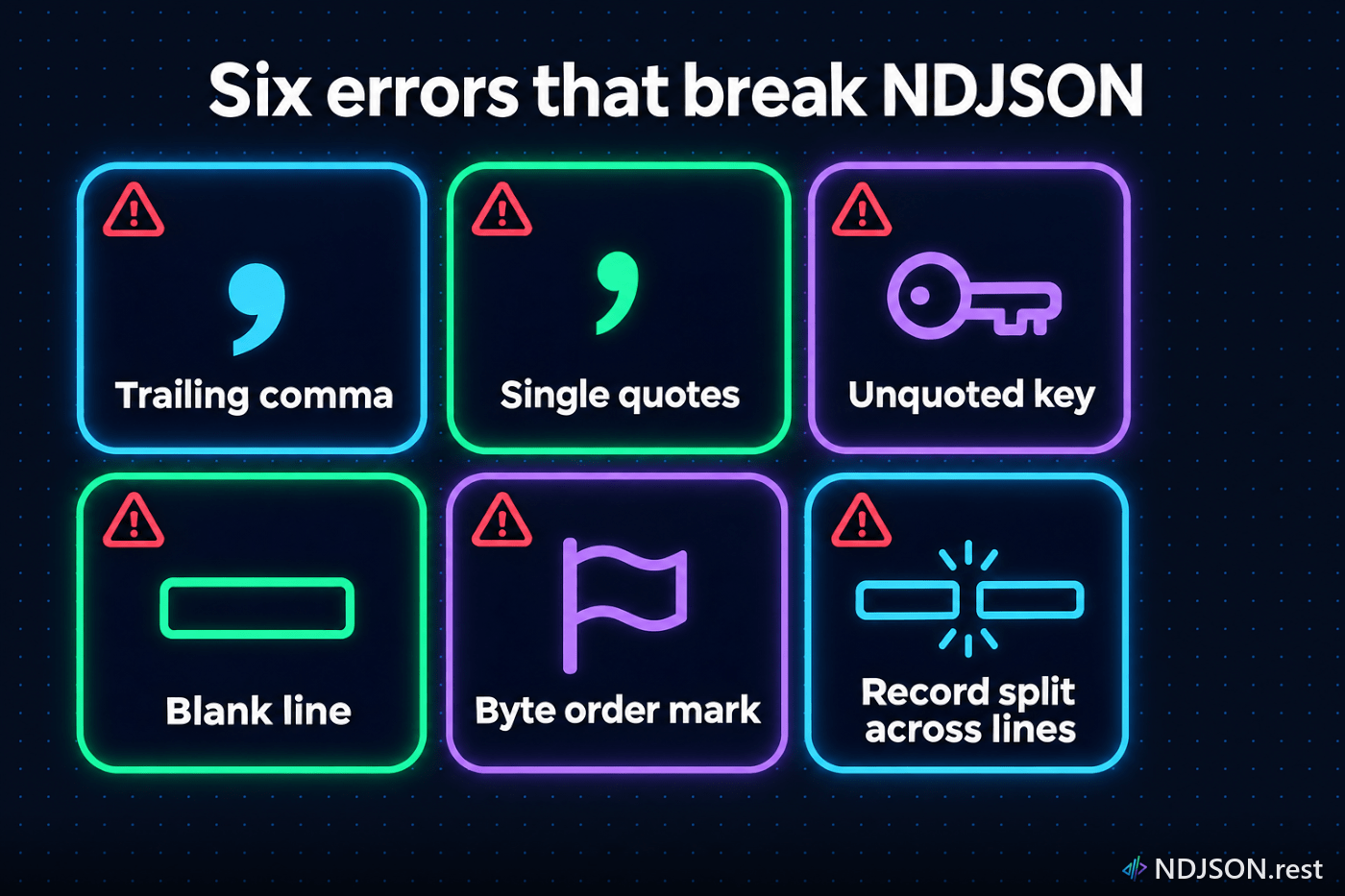
| Error | Example line | Usual cause | Fix |
|---|---|---|---|
| Trailing comma | {"id": 1, "name": "Ada"}, | Lines copied out of a JSON array | Remove the comma after the closing brace |
| Single quotes | {'id': 1, 'name': 'Ada'} | Printing a Python dict instead of calling json.dumps | Use double quotes for keys and strings |
| Unquoted key | {id: 1, name: "Ada"} | A JavaScript object literal pasted as data | Wrap every key in double quotes |
| Array wrapper | [{"id": 1}, | The file is a JSON array, not NDJSON | Convert with the "JSON to NDJSON" button |
| Record split across lines | { | Pretty-printed output | Re-serialize each record without indentation |
| Two records on one line | {"id": 1}{"id": 2} | A writer that forgot the newline | Split into one record per line |
| JavaScript-only values | {"score": NaN, "x": undefined} | Serializing without a JSON library | Replace with null or a real number |
| Comment | {"id": 1} // first user | Treating the file like source code | Delete it, or move the note into a field |
| Byte order mark | Invisible bytes before the first { | Saved as "UTF-8 with BOM" on Windows | Save as plain UTF-8; the auto-fix strips it |
| Blank line | An empty line between records | A double newline from string joining | Remove it; many platforms reject empty lines |
Want the exact wording your parser prints for each of these? See the error dictionary. For the reasons they happen in the first place, read common NDJSON mistakes.
What "Valid NDJSON" Actually Means
"It validates" can mean three different things. A file can pass the first and still be rejected by the system you are sending it to, so it helps to know which level you have checked.
Level 1: Syntax
Every line parses as JSON and the file is UTF-8. This is the only level the format itself defines, and it is what this validator checks by default.
Level 2: Consistency
Every record has the same keys, each key keeps one type, and IDs are unique. Turn on the schema consistency and duplicate checks in Validation Options to test this.
Level 3: Platform rules
The receiving system's own requirements: required fields, allowed values, record and file size limits. The OpenAI Format option covers one such rule set; for a contract of your own, use JSON Schema validation.
Before You Upload: A 60-Second Checklist
- Zero syntax errors. Validate the whole file, not a sample. One bad line at record 40,000 is enough to fail a job.
- The record count matches what you expect. Compare the valid-line count here with the row count of your source.
- No blank lines and no byte order mark. Both are invisible in most editors and both are common rejection reasons.
- Keys are spelled the way the platform spells them.
messageis notmessages. Check one record against the platform's own example. - Types are stable. An
idthat is a number on one line and a string on the next will break table loaders. - The file ends with a newline. It is optional in the specification but expected by many tools.
Why Choose Our Validator
| Feature | NDJSON.rest Validator | Other Validators |
|---|---|---|
| Client-side privacy | Yes | No |
| Line-by-line parsing | Yes | No |
| Schema consistency check | Yes | No |
| Duplicate ID detection | Yes | No |
| Auto-fix (10 strategies) | Yes | No |
| File upload & drag-drop | Yes | Yes |
| Export valid lines | Yes | No |
| Free, no signup | Yes | Yes |
Lines validated in under 1 second
Server round-trips required
Validating sends no network request once the page has loaded
Limitations
Where this tool stops, and what to reach for instead.
Table View shows the first 100 rows
Table View renders at most 100 rows no matter how many valid lines your file has, and each cell is truncated at 50 characters. Validation itself still covers every line, so the summary counts and the error list are complete even when the table is not. Use Download Valid Lines or Download CSV to get the full data.
Error lines are truncated at 200 characters
When a line fails to parse, the report echoes the first 200 characters of it and tells you how many characters were held back. The line number and the parser message are always exact, so a very wide record still points you to the right place in your editor.
JSON Schema support is a subset
The optional schema check reads three keywords: type (including integer), required, and properties one level deep. It does not implement $ref, enum, pattern, items, or schemas nested inside properties. Unsupported keywords are ignored rather than reported, so a clean result here is not proof of full schema conformance. For that, run a complete validator such as Ajv or jsonschema - the schema validation guide covers both, plus how to apply a schema per line and enforce it in CI.
Very large files will freeze the tab
There is no file-size cap and no Web Worker. The whole file is read into a single string and parsed on the main thread, so the tab stops responding for as long as that takes and a file large enough to exhaust memory will kill it outright. Multi-gigabyte logs and exports belong in a streaming tool: jq for line-by-line checks, or DuckDB to query the file directly.
Auto-Fix is a heuristic, one line at a time
Auto-Fix guesses at the intent of a broken line and cannot repair a JSON value split across several lines. It will not silently drop anything: a line holding several values run together is split into one line per value, and if any of those values cannot be made valid on its own the fix is refused with a warning instead of applied. Always re-validate after a fix, and diff the result before you overwrite the original file.
Trusted for Validating Data Used With
Built for Your Workflow
OpenAI Fine-Tuning
Validate chat and completion format before uploading training data.
Elasticsearch Bulk
Verify bulk indexing payloads before sending to your cluster.
BigQuery Export
Check schema consistency in NDJSON exports from BigQuery.
Kafka Messages
Validate NDJSON message payloads for streaming pipelines.
Validate NDJSON in Your Language
Python
import json

with open("data.jsonl") as f:
    for i, line in enumerate(f, 1):
        try:
            json.loads(line)
        except json.JSONDecodeError as e:
print(f"Line {i}: {e}")Node.js
const fs = require("fs");
const readline = require("readline");

// Stream: never loads the file into memory
const rl = readline.createInterface({
  input: fs.createReadStream("data.jsonl"),
  crlfDelay: Infinity
});

let n = 0;
rl.on("line", (line) => {
  n++;
  if (!line.trim()) return; // blank/trailing line
  try {
    JSON.parse(line);
  } catch (e) {
    console.error(`Line ${n}:`, e.message);
  }
});jq (CLI)
# Validate each line
jq -e . data.jsonl > /dev/null

# Count valid lines (invalid lines are skipped)
jq -cR 'fromjson?' data.jsonl | wc -l

# Pretty-print first line
head -1 data.jsonl | jq .Frequently Asked Questions
What is an NDJSON validator?
An NDJSON validator checks that each line of a Newline Delimited JSON file contains valid JSON syntax. It parses every line independently and reports any syntax errors with line numbers and explanations.
Is my data safe when using this validator?
Your data is never sent to any server. This validator runs entirely in your browser using JavaScript, and validating makes no network request once the page has loaded. Note that your input is cached in this browser's local storage so it survives a reload, which means an unencrypted copy stays on your own device until you clear the input or clear this site's stored data.
What file formats does the validator support?
The validator accepts .jsonl, .ndjson, .json, and .txt files. You can also paste text directly or import from a URL. Any text file with one JSON value per line works.
How large of a file can I validate?
The validator handles files with 100,000+ lines in under a second. Performance depends on your browser and device, but most modern browsers handle several megabytes easily.
Can this validator check OpenAI fine-tuning data?
Yes. Enable the "OpenAI Format" checkbox in Validation Options. It checks both chat format (messages with role/content) and completion format (prompt/completion pairs) against OpenAI requirements.
What is the difference between JSONL and NDJSON?
JSONL (JSON Lines) and NDJSON (Newline Delimited JSON) are the same format - one valid JSON value per line, separated by newline characters. This validator works with both.
Can the validator fix errors automatically?
Yes. Each error includes a "Try Auto-Fix" button with 10 fix strategies covering all common NDJSON mistakes: stripping comments, removing array wrappers, replacing single quotes, quoting unquoted keys, removing trailing commas, replacing JavaScript literals (undefined/NaN/Infinity), closing missing braces, splitting concatenated objects, removing invisible characters, and stripping BOM markers.
How do I convert JSON to NDJSON?
Paste your JSON array into the text area and click the "JSON to NDJSON" button above it. Each element of the array becomes a separate line. You can also convert NDJSON back to a JSON array.
Does it work with real-time validation?
Yes. Enable the "Real-Time" checkbox in Validation Options and the validator will check your data as you type with a short delay, giving you instant feedback.
Can I view my data in a table format?
Yes. After validating, click the "Table View" button to see your valid records displayed in a sortable table with columns based on the keys in your data. Up to 100 rows are shown.
My file passes here but the upload is still rejected. Why?
Passing validation means every line is well-formed JSON. The platform you are uploading to adds rules of its own on top: required fields, allowed values, a maximum record size or a maximum file size. Read the rejection message for a line number or field name, then compare that record with the platform's documented example.
How do I validate an NDJSON file from the command line?
Run jq -c . data.jsonl > /dev/null. jq exits with an error and names the first line it cannot parse. For a report of every bad line instead of only the first, use the Python or Node.js scripts in the "Validate NDJSON in Your Language" section above, or the tools page.
Is every line required to be a JSON object?
Not by the specification. A line may hold any JSON value, including an array, a string, a number or null. In practice almost every system that consumes NDJSON expects an object on each line, so treat objects as the rule unless you control both ends. The definition page quotes the exact wording.
Does the validator work offline?
Once the page has loaded, validating needs no network connection because all of the parsing happens in your browser. Only the "Import from URL" feature needs to reach the network, to fetch the file you point it at.